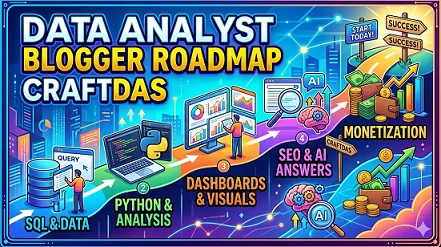

Data Analyst Blogging Roadmap: From Zero to Monetized Authority
A phased, search-intent driven plan for aspiring data analysts to learn the field, rank tutorials, build authority, and earn — starting with beginner-friendly content, not random Python or SQL tips.
Google’s guidance: Helpful, reliable, people-first content wins. Google’s AI features & Bing Webmaster Guidelines reward content that answers real questions, surfaces in Copilot & AI search. This roadmap aligns with E-E-A-T and answer-engine optimization. If you're new to the platform, start by reading the Welcome to Craftdas guide to understand the connected ecosystem you'll be building within.
Why most new data analyst bloggers fail: They start by posting scattered "Python tips" or "Excel shortcuts" without a strategic foundation. Instead, a winning data analyst blogger learns the field in phases, understands search intent (tutorials, tool comparisons, career advice, portfolio projects), publishes beginner-friendly articles, builds internal links, optimizes for both search engines and AI answers, then monetizes through Craftdas blogging, affiliate offers (courses, software, hardware), templates, freelance services, and future courses. This guide gives you the exact playbook. The overall philosophy aligns with the reality that blog posts take time to rank — you're building long-term assets, not chasing quick wins. For similar structured roadmaps in adjacent creative and technical niches, explore the Content Writing Blogger Roadmap and the 3D Artist Blogging Roadmap — the same phased principles apply across disciplines.
Phase 1 — Beginner Data Analyst Foundation
Goal: Understand what data analysis is, how the industry works, and what beginners actually search for. First posts must answer real beginner questions, not showcase advanced machine learning models that intimidate readers. The data analysis field spans business intelligence, data science, analytics engineering, marketing analytics, financial analysis, healthcare analytics, and operations research. A beginner blogger does not need to master everything. The smart path is to learn one area (e.g., SQL for business analysts, Python for data cleaning, or Excel for reporting) and teach as you learn. This "learn in public" approach builds trust and attracts readers who are at the same stage as you were weeks ago. The good news is that you can write posts that Google and AI understand even without SEO tools — clarity and structure matter more than software.
What to post first: Beginner guides, tool explainers (SQL, Python, Excel, Tableau, Power BI), data analysis glossary, simple tutorials (how to write a SELECT statement, how to clean data in pandas), common mistakes, free datasets, and tool comparisons (Excel vs Python, Tableau vs Power BI). Each piece of content should answer one clear question that a complete novice types into Google or Bing. For example, "what is data analysis for beginners" has significant search volume but moderate competition — you can rank by writing a truly helpful, detailed guide of 2,500+ words with examples, a glossary, and a FAQ section. Including a definition box within the first 150 words also increases your chances of appearing in Google's AI Overviews and Bing's Copilot responses, because answer engines extract concise definitions from well-structured content. Do not write thin, 500-word articles. Write definitive resources that become the go-to reference for beginners in your sub-niche. That is how you build topical authority from day one.
Research queries to target (each becomes its own article): what is data analysis for beginners, how does data analysis work, SQL vs Python for data analysis, data analysis terms every beginner should know, types of data analysis (descriptive, diagnostic, predictive, prescriptive), common data analysis mistakes beginners make, how to learn data analysis from scratch, best free data analysis tools for beginners, best paid data analysis tools for professionals, how to do your first data analysis project, data cleaning basics for beginners, data visualization for beginners, statistics basics for data analysts, how to build a data analyst portfolio, how to get a data analyst job with no experience. Each of these articles should internally link to each other, forming a content hub that Google recognizes as a topical cluster.
Insight specific to data analysts: New data analyst bloggers often skip "why data analysis matters for different industries." Create a post: "Why ecommerce, finance, healthcare, and marketing teams pay for data analysis — 5 industries explained" — that attracts both aspiring data analysts AND potential clients (small business owners, marketing managers, startup founders). This dual-audience approach is powerful because it brings traffic from two distinct search intents: people wanting to learn data analysis, and people wanting to hire data analysts. Both are monetizable. The aspiring analyst may buy your templates, courses, or affiliate software. The business owner may hire you for freelance analysis. To optimize this post for Google, include subheadings like "Industry 1: Ecommerce (conversion analysis, customer segmentation, inventory forecasting)" and "Industry 2: Finance (fraud detection, risk assessment, portfolio optimization)." Add a real-world case study or hypothetical example showing how a small online store increased sales by 25% after implementing basic data analysis. Data-driven sections perform well in search results because they signal expertise and usefulness.
Phase 2 — Pick A Clear Data Analyst Sub-Niche
Instead of being a generic "data analysis blog" covering everything from Excel to Python to Tableau to machine learning, specialize. Readers trust specialists, and search engines reward niche authority. A blog that covers "SQL for marketing analysts" will outrank a general data blog for keywords like "how to write SQL queries for campaign analysis" or "marketing data reporting." The same principle applies across all sub-niches. Specialization also increases conversion rates because visitors feel you understand their specific problems. A marketing manager searching for "how to analyze Facebook Ads data" will immediately trust a blog that has multiple articles about marketing analytics, rather than a blog that writes about everything from genomics to astrophysics. Google's algorithm detects this relevance through co-occurrence of niche-specific terms throughout your site.
Best sub-niches with high search demand and reasonable competition for beginners:
- SQL for business analysts — SQL is the most essential data analysis skill. Focus on SELECT statements, joins, aggregations, window functions, and query optimization for business reporting.
- Python for data analysis (pandas, numpy) — Pandas is the go-to library for data manipulation. Teach data cleaning, transformation, aggregation, and merging. Target aspiring data scientists and analysts.
- Excel for data analysis — Excel remains ubiquitous in small and medium businesses. Teach PivotTables, Power Query, formulas, dashboards, and data visualization.
- Data visualization (Tableau or Power BI) — Teach how to create compelling dashboards, choose chart types, and tell stories with data. Target business intelligence professionals.
- Marketing analytics — Teach Google Analytics, campaign tracking, customer segmentation, ROI calculation, and attribution modeling. Target marketers and small business owners.
- Business intelligence and reporting — Teach KPI definition, dashboard design, automated reporting, and stakeholder communication. Target analysts in corporate settings.
- Financial data analysis — Teach Excel financial modeling, ratio analysis, forecasting, and investment metrics. Target finance professionals and small business owners.
- Data cleaning and preparation — Teach how to handle missing values, outliers, inconsistent formatting, and data type conversion. Target analysts who spend 80% of their time cleaning data.
- Portfolio projects for beginners — Teach how to build end-to-end projects from question to analysis to visualization to presentation. Target career-changers and job seekers.
- Interview preparation for data analysts — Teach SQL interview questions, case study frameworks, take-home assignments, and behavioral questions. Target job seekers.
Research queries to find your profitable angle: profitable data analysis blog niches, best data analytics niches for beginners, data analysis topics people search for, SQL tutorial niche ideas, Python for data analysis blog topics, Tableau blog topics, Power BI blog ideas, marketing analytics blog topics for beginners, most requested data analysis services online (dashboard creation, data cleaning, reporting automation, ad hoc analysis, consulting), how to position a data analysis blog for affiliate marketing, data niche with high buyer intent (people searching for "hire data analyst," "data analysis services," "custom dashboard").
Once you pick your sub-niche, write a "manifesto post" explaining exactly who you serve and what problems you solve. For example: "Why I Help Marketing Managers Analyze Campaign Data Without Learning Python" or "The Complete Guide To Building Your First Data Analyst Portfolio." This pillar page will become your highest-converting service page over time.
Phase 3 — Keyword Research For Data Analyst Blog
Goal: Find what people already search for before writing. Keyword research eliminates guesswork and ensures every article you publish has existing search demand. Many beginners skip this step and write about topics they find interesting but nobody searches for (e.g., "how to use lambda functions in pandas" might have very low search volume), leading to zero traffic and demotivation. Proper keyword research takes 1-2 hours per week but saves months of wasted effort. For a data analysis blog, focus on keywords with "how to," "what is," "best," "vs," "for beginners," "tutorial," "tips," "free," "example," "practice," "interview," "project," "portfolio," "job," "salary," "certification," and "course" modifiers because these indicate clear informational, commercial, or career intent. Avoid head terms like "data analysis" (too competitive) and instead target long-tail phrases like "how to do customer segmentation in SQL" or "best free datasets for data analysis projects."
What to post after keyword research: Tutorials that solve specific data problems (how to handle missing values in pandas, how to write a self-join in SQL), software comparison posts (Power BI vs Tableau for beginners), tool roundups (best free SQL editors), mistake posts (common SQL syntax errors), checklist posts (data cleaning checklist), and beginner roadmaps like this one. Each content type aligns with specific keyword intents. A "how-to" tutorial matches transactional and informational queries. A "mistake post" attracts readers who have already tried something and failed, making them more likely to buy a solution (e.g., a paid course or consulting). A "tool post" captures commercial intent — people comparing software before purchasing.
Research queries to use in your keyword tool (Ubersuggest, Keysearch, Ahrefs, or Google Keyword Planner):
- keyword research for data analysis blog
- low competition SQL keywords
- long tail keywords for Python data analysis
- data analysis keyword ideas for beginners
- Excel data analysis keywords with low competition
- Tableau tutorial keywords for blog posts
- Power BI keywords for SEO
- marketing analytics keywords for beginners
- data analysis questions people ask on Google
- People Also Ask data analytics topics
- how to use Google autocomplete for data keywords
- how to find informational keywords for data analysis
- how to find buyer intent keywords for data services
- best free SEO tools for beginner bloggers
Example keyword table for a data analysis blog:
- Keyword: "how to join tables in SQL" — Volume: 5,000-15,000 — Difficulty: Medium — Intent: Informational — Article: Step-by-step SQL JOIN tutorial with diagrams
- Keyword: "pandas vs Excel for data analysis" — Volume: 500-2,000 — Difficulty: Low — Intent: Commercial — Article: Comparison post with affiliate links to pandas courses and Excel resources
- Keyword: "best free Power BI dashboards examples" — Volume: 500-2,000 — Difficulty: Low — Intent: Commercial — Article: Roundup post with examples and affiliate link to Power BI
- Keyword: "how much to charge for data cleaning" — Volume: 200-800 — Difficulty: Low — Intent: Commercial — Article: Pricing guide + service CTA
- Keyword: "common SQL interview questions" — Volume: 5,000-20,000 — Difficulty: Medium — Intent: Informational/Commercial — Article: Question list with answers and affiliate link to interview prep course
Create a spreadsheet with columns for keyword, search volume, keyword difficulty, intent (informational, commercial, transactional, navigational), and suggested article title. Target 2-3 keywords per article, with one primary keyword in the H1 tag and secondary keywords in H2s and body text. This structured approach signals relevance to Google's ranking algorithms.
Phase 4 — Content Pillars For The Data Analyst Blog
Content pillars are the five core topic categories that every article on your blog belongs to. They create an information architecture that search engines can easily crawl and understand. When you organize your blog around clear pillars, you build topical authority faster because Google sees that you have comprehensive coverage of a subject, not just isolated articles. Each pillar becomes a silo of interlinked content, with a pillar page at the top and cluster articles supporting it with internal links. This structure also improves user experience — readers can navigate from a beginner post to an advanced post within the same pillar without getting lost.
Pillar 1: Data Analysis Basics For Absolute Beginners — This pillar targets people who have never analyzed data professionally. Articles should answer foundational questions, define industry terms, and provide a clear learning path. Target keywords include: data analysis beginner guide (aim for 3000+ words with a table of contents, glossary, and simple project), how to start data analysis (include a step-by-step week-by-week plan), data analysis process step by step (define question, collect, clean, analyze, visualize, present), what should a beginner learn first (prioritize: SQL, then Excel, then Python or Tableau), data analysis learning roadmap (create a visual timeline from month 1 to month 12), types of data analysis (descriptive, diagnostic, predictive, prescriptive — each with examples), essential data analysis skills for beginners (SQL, data cleaning, statistics, visualization, communication), how to build a data analyst portfolio (what to include, where to host, how to present). For inspiration on the portfolio aspect, review the Content Writing Blogger Roadmap for its approach to showcasing work samples and client acquisition.
Pillar 2: SQL And Database Querying — This pillar attracts readers who need to learn SQL for data extraction and analysis. SQL is the single most important skill for data analysts — prioritize this pillar heavily. Target keywords: SQL for absolute beginners (first 30-minute tutorial), SQL SELECT statement explained, SQL WHERE clause with examples, SQL JOIN types (INNER, LEFT, RIGHT, FULL) explained with diagrams, SQL GROUP BY and aggregation functions (COUNT, SUM, AVG, MIN, MAX), SQL ORDER BY and LIMIT, SQL subqueries for beginners, SQL window functions (ROW_NUMBER, RANK, LEAD, LAG), SQL CTE (Common Table Expression) explained, SQL date functions and filtering, SQL string manipulation, SQL indexing basics for query performance, SQL vs NoSQL for data analysis, best free SQL editors and databases (SQLite, PostgreSQL, MySQL), common SQL syntax errors and fixes, SQL practice problems for beginners, SQL interview questions with answers.
Pillar 3: Python For Data Analysis (Pandas, NumPy, Matplotlib) — This pillar teaches readers how to use Python for data manipulation, analysis, and visualization. Target keywords: Python for data analysis for beginners, how to install pandas and Jupyter Notebook, pandas Series and DataFrame explained, how to read CSV and Excel files in pandas, pandas data inspection methods (head, info, describe, value_counts), how to filter and select data in pandas (loc, iloc, boolean indexing), how to handle missing values in pandas (dropna, fillna, interpolate), how to clean and standardize data in pandas (strip, replace, rename, convert dtypes), pandas groupby and aggregation explained, pandas merge and join (similar to SQL JOINs), how to create pivot tables in pandas, how to visualize data with matplotlib and seaborn (line plots, bar charts, histograms, scatter plots, heatmaps), numpy basics for numerical operations (array, mean, median, standard deviation, correlation), pandas vs Excel performance comparison, best Python data analysis libraries, common pandas errors and fixes, where to find datasets for pandas practice.
Pillar 4: Data Visualization And BI Tools (Tableau, Power BI, Excel) — This pillar teaches readers how to create compelling charts, dashboards, and reports. Target keywords: data visualization for beginners, chart types explained (bar, line, pie, scatter, histogram, box plot, heatmap, tree map), how to choose the right chart for your data, Tableau for absolute beginners, Tableau vs Power BI comparison, Power BI for beginners (first dashboard), Excel charts and PivotCharts tutorial, how to create an interactive dashboard in Tableau, how to create a dashboard in Power BI, best free data visualization tools for beginners, how to tell a story with data, dashboard design best practices (layout, color, filtering, labeling), how to connect Tableau to SQL database, how to publish Tableau dashboards to web, Power BI data modeling basics, Excel Power Query for data transformation, common data visualization mistakes (misleading axes, wrong chart types, excessive colors), data visualization portfolio examples, how to get a job as a BI analyst.
Pillar 5: Monetization — Services, Affiliates, Templates, And Courses — This pillar is critical for income. It teaches readers how to make money with data analysis skills, and it also serves as a platform for you to sell your own products and services. Target keywords: how to make money with data analysis, best freelance platforms for data analysts (Upwork, Fiverr, Toptal, Freelancer, PeoplePerHour), how to find data analysis freelance clients, how to price data analysis services (per hour, per project, retainer), data analysis service packages (data cleaning, dashboard creation, ad hoc analysis, reporting automation, consulting), how to create a data analyst portfolio that gets clients, how to sell data analysis templates (Excel dashboards, SQL query templates, Python analysis notebooks) on Craftdas Market, best affiliate programs for data analysts (Craftdas, DataCamp, Coursera, Udemy business courses, Tableau, Power BI, Alteryx, SQL Server, pandas-related tools, Excel add-ins, data visualization courses), how to create a paid data analysis course (SQL bootcamp, pandas mastery, dashboard design, interview prep), how to build an email list as a data analyst blogger, how to use your blog to drive freelance inquiries, affiliate clicks, and template sales.
Each pillar should have a dedicated category page on your blog that explains the pillar and lists all related articles. Interlink pillar pages to each other where relevant — for example, the Python pillar links to the SQL pillar for data extraction, and the visualization pillar links to both for sourcing and presenting data. The structured approach to content ecosystems is also demonstrated in the 3D Artist Blogging Roadmap, where similar pillar organization is applied to artistic and technical tutorials.
Phase 5 — How To Write Posts That Can Rank (Search + AI Answers)
Goal: Every post should answer one clear search intent. Search intent is the "why" behind a user's query. If someone searches "best data visualization tools," they want a curated list with comparisons, pricing, and recommendations (commercial intent). If they search "how to use pandas groupby," they want a step-by-step tutorial with code examples (informational intent). If they search "hire data analyst for dashboard," they want a service page with portfolio, pricing, and contact form (transactional intent). Matching intent is the single most important ranking factor after relevance. Google measures this through user behavior — if people click your result and immediately bounce back to Google because your page didn't match what they wanted, your rankings will drop. Always check the top 3 Google results for your target keyword before writing. If they are all listicles, write a listicle. If they are all step-by-step tutorials, write a tutorial. If they are all service pages, do not try to rank a tutorial — the intent is transactional.
Recommended post structure that satisfies both human readers and ranking algorithms:
- Clear title with the main keyword near the beginning. Example: "SQL JOINs Explained For Beginners: A Step-by-Step Guide With Examples" — not "Mastering SQL Queries." The keyword-forward title improves click-through rates and relevance signals.
- Short direct answer within the first 150 words. For "what is a SQL JOIN," write: "A SQL JOIN clause combines rows from two or more tables based on a related column between them. Common JOIN types include INNER, LEFT, RIGHT, and FULL OUTER JOIN." This short answer optimizes your content for Google's AI Overviews and featured snippets.
- Beginner-friendly explanation using simple language, short sentences, and active voice. Define every technical term the first time you use it (explain "table," "column," "row," "key field," "primary key," "foreign key," "NULL," "record," "query," "result set"). Break complex ideas into analogies (e.g., "a SQL JOIN is like combining two spreadsheets by matching addresses — you tell SQL which column to match on.").
- Step-by-step guide with numbered steps and code blocks. For SQL or Python tutorials, include formatted code blocks that readers can copy and paste. Each step should produce visible output. Avoid vague instructions like "manipulate the data" — instead say "type
df['new_column'] = df['old_column'].str.upper()to convert text to uppercase." - Examples of good and bad code/data practices. Show a slow, inefficient query and explain why it's slow, then show an optimized version with indexes or better join order. For data cleaning, show messy data (inconsistent formats, missing values, duplicates) and cleaned data after transformation. Examples increase time-on-page and demonstrate E-E-A-T.
- Common mistakes section with at least 5 specific errors. For SQL: forgetting GROUP BY with aggregates, incorrect JOIN logic, filtering aggregated data with WHERE instead of HAVING, using SELECT *, missing indexes. Use a table format: Mistake | Why It Hurts | How To Fix It.
- Checklist or downloadable resource. A printable "SQL query checklist," "data cleaning cheat sheet," or "dashboard design quick reference" increases email signups (if gated) or return visits. Checklists also increase dwell time.
- Internal links to 3-5 related posts. For a post about pandas, link to "how to install pandas," "pandas vs Excel," "data cleaning in pandas," "pandas groupby tutorial," and "visualization with matplotlib." Internal links distribute link equity and help search engines understand your site's structure.
- Craftdas CTA that matches the post's intent. For tutorials: "download my free Jupyter notebook with example code from Craftdas Market." For comparison posts: "compare data analytics tools on Craftdas." For career content: "hire me for portfolio review and interview prep." If you plan to sell digital products, review the guide on how to sell digital products online on Craftdas Market.
- FAQ section with 5-10 questions and concise answers. Use FAQ schema markup (JSON-LD) to help Google show your FAQ directly in search results as rich results, increasing click-through rates.
Additional insight for AI answers: Answer engines prioritize structured, concise, authoritative content. Use definition lists, include a "key takeaways" box at the top of long tutorials, format code keywords as code blocks, and cite sources for technical information (official documentation links). When AI engines summarize your tutorial and attribute it to your blog, you get brand exposure and referral traffic even without direct clicks.
Phase 6 — Internal Linking Strategy For Data Analysis Topic Clusters
Goal: Build topic authority by connecting related posts together into a content silo or topic cluster model. Internal links are one of the most underutilized ranking factors. When you link from a high-authority pillar page to a new cluster post, you accelerate that new post's ability to rank. A well-linked blog allows Googlebot to discover all your content in just a few clicks, while a poorly linked blog leaves pages orphaned (no internal links pointing to them), and orphaned pages rarely rank.
Main pillar article (the central hub for the entire data analysis ecosystem): Data Analysis For Beginners: The Complete Roadmap To Learning SQL, Python, And Making Money On Craftdas — 5,000-10,000 words with table of contents linking to each section, and each section linking out to dedicated cluster articles. This article cross-links to other roadmap content on the platform: readers interested in building a full creator ecosystem can also explore the Content Writing Blogger Roadmap and the 3D Artist Blogging Roadmap for adjacent monetization strategies.
Supporting posts (cluster content that answers specific sub-questions):
- What Is Data Analysis And How Does It Work?
- SQL For Absolute Beginners: First SELECT Query
- How To Clean Data In Pandas (Step-by-Step)
- Power BI vs Tableau: Which Should You Learn First?
- How To Build A Data Analyst Portfolio (With Examples)
- Common SQL Mistakes Beginners Make
- Best Free Datasets For Data Analysis Projects
- How To Make Money With Data Analysis On Craftdas
Research queries for internal link architecture: internal linking strategy for data analysis blog, topic clusters for SQL SEO, data analytics content cluster examples, pillar page for data analyst blog, how to create topical authority in data analysis (publish 30+ interlinked articles on related subtopics), best anchor text for internal links (descriptive: "this guide to SQL JOINs" not generic "click here"), how many internal links per blog post (5-10 natural links per 2000 words), how to link related tutorials (when you mention "data cleaning," link to your data cleaning tutorial), SEO silo structure for data blog, internal linking mistakes bloggers make (orphaned pages, broken links, non-descriptive anchor text), how to link service pages from tutorial content (contextual CTA: "need a custom dashboard? Hire me"), how to use internal links to rank data blog posts (link from high-traffic pages to newer posts).
Phase 7 — Ranking In Search Engines And AI Answers
Goal: Make your content easy for Google, Bing, AI search (Google SGE, Bing Copilot, Perplexity), and answer engines to understand and extract. The new search landscape includes zero-click searches where users get answers directly on the results page. Understand the reasons why blog posts take time to rank — this will keep you motivated during the early months.
Best content types that AI engines love to surface for data analysis topics:
- Definition posts: "What is a SQL JOIN" with definition, examples, and comparison table of JOIN types.
- Beginner roadmap posts: "How to learn data analysis in 6 months" with week-by-week numbered steps.
- Checklist posts: "Data cleaning checklist (15 things to check before analysis)."
- Comparison posts: "Pandas vs SQL vs Excel for data manipulation."
- Step-by-step tutorials: Numbered steps with code blocks and expected outputs.
- FAQ posts: "50 data analyst interview questions with answers."
- Mistake-and-fix posts: "5 SQL performance killers (with fixes)."
- Resource posts: "Best free datasets for data analysis projects 2025."
Research queries for AI and answer engine optimization: how to optimize SQL tutorials for AI answers, how to appear in AI answers with Python content, answer engine optimization for data analysts, how to structure pandas tutorials for AI search, how to write direct answers in data posts, how to optimize for Google AI Overviews, how to optimize for Bing Copilot search, how to write FAQ schema for data analysis tutorials, how to make data content easy for AI to summarize, how to rank data analysis blog posts, how to write experience-based data content (share your "when I learned this concept, I struggled with X" stories), how to create helpful data content that truly teaches (include downloadable datasets, code notebooks, and cheat sheets), how to write original data examples (use real datasets like public COVID data, not fake data), how to optimize blog posts for featured snippets.
Phase 8 — Craftdas Blog + Affiliate Monetization For Data Analysts
Goal: Turn traffic into income, not just views. The most profitable data analysis blogs use multiple revenue streams: affiliate income (courses, software, hardware), digital product sales (templates, notebooks, dashboards), and services (freelance analysis, dashboard creation, consulting). Craftdas provides a unique advantage because it combines blogging, marketplace, affiliate program, and service platform in one ecosystem.
Money routes on Craftdas for data analysts (use all of them):
- Publish data analysis tutorials on Craftdas (monetize through display ads once you have 10,000+ monthly pageviews).
- Promote Craftdas affiliate offers (refer new bloggers, buyers, or sellers to Craftdas).
- Recommend data analysis software, courses, and hardware as an affiliate (DataCamp, Coursera, Udemy, LinkedIn Learning, Tableau, Power BI, Alteryx, SQL Server, pandas-related tools, Excel add-ins, data visualization courses, SQL practice websites, interview prep platforms, and any tool you genuinely use).
- Sell data analysis templates and notebooks on Craftdas Market (Excel dashboards, SQL query templates, Python analysis notebooks, Power BI templates, Tableau workbooks, data cleaning scripts, interview study guides, portfolio project files). Price templates $5-$50 depending on complexity. Bundle 5-10 assets into a "starter pack" for $20-$50. Learn to optimize your listings with the creator's guide to selling digital products.
- Offer data analysis services (data cleaning, dashboard creation, ad hoc analysis, reporting automation, SQL query optimization, Python scripting, consulting). Create a "Hire Me" page with pricing packages.
- Create paid data analysis courses (once you have 50+ blog posts and an email list, create a course: "SQL Bootcamp for Business Analysts" or "Pandas for Data Cleaning Masterclass" priced $197-$997).
- Offer portfolio review and interview coaching (review data analyst portfolios, conduct mock interviews, provide feedback on resumes. Price $50-$200 per session or package).
Research queries for monetization: how data analysts make money with blogs, affiliate marketing for data analysis bloggers, best affiliate programs for data analysts (Craftdas, DataCamp (15-50% recurring), Coursera (10-45%), Udemy (15-25% for instructor referrals), Tableau, Power BI, Excel add-ins), how to write data tool affiliate posts that convert, how to sell data templates online, how to price data analysis templates, how to offer data analysis services on Craftdas, how to turn blog readers into clients, how to build income streams from a data analysis blog.
Phase 9 — Massive Growth Content Strategy For Data Analysts
Goal: Create posts that attract beginners, small business owners, hiring managers, and affiliate clicks. Prioritize high-income post types.
High-income post types for data analysis blogs:
- Best data analysis software posts — "Best SQL editors for beginners" or "Best data visualization tools for small business." Monetize through affiliate links.
- Software comparison posts — "Power BI vs Tableau: which is better for your business?" or "pandas vs Excel vs SQL." High-intent commercial keywords.
- Best courses posts — "Best SQL courses for beginners (2025)" with affiliate links to DataCamp, Coursera, Udemy.
- Free resources roundups — "50+ free datasets for data analysis projects" — collect emails for the full resource list.
- Portfolio project posts — "How to build a data analyst portfolio that gets you hired" — monetize via portfolio review service.
- Pricing guide posts — "How much to charge for data analysis services (2025 guide)" — attracts freelancers and clients.
- Mistake posts — "7 SQL mistakes that make your queries slow" — high shareability, monetize via performance optimization consulting.
- Interview prep posts — "50 SQL interview questions and answers" — monetize via interview coaching or premium question bank.
Research queries for high-income data content: best SQL courses for beginners 2025, best data visualization tools for small business, Power BI vs Tableau comparison, free datasets for data analysis projects, how much to charge for data cleaning, data analyst freelance pricing guide, common SQL performance mistakes, data analyst portfolio examples, how to get a data analyst job with no experience.
Phase 10 — 90-Day Posting Plan For Data Analysts
This 90-day plan assumes you publish 2-3 articles per week. Consistency matters more than volume. Each article should be 1500-3000 words minimum with code examples, screenshots, and downloadable resources where relevant.
Month 1: Learn And Publish Basics (Foundation Phase)
- Week 1: "data analysis for beginners" (3000+ word pillar preview) + "what is data analysis" (2000+ word definition post with industry examples)
- Week 2: "how to learn data analysis from scratch" (step-by-step roadmap) + "SQL vs Python for data analysis" (comparison post with table)
- Week 3: "data analysis terms every beginner must know" (glossary with 50+ terms) + "common data analysis mistakes beginners make" (12 mistakes with examples)
- Week 4: "best free data analysis tools for beginners" (roundup) + "how to do your first SQL query (SELECT statement)"
End of Month 1: 8-10 posts, 500-2000 monthly pageviews.
Month 2: Build Authority And Internal Links (Cluster Phase)
- Week 5: "SQL JOIN types explained with examples" (with diagrams) + "how to clean data in pandas (missing values, duplicates)"
- Week 6: "Excel PivotTables for data analysis" + "how to create a dashboard in Tableau"
- Week 7: "Python vs Excel: which should you learn first?" + "how to build a data analyst portfolio"
- Week 8: "data cleaning checklist (10 steps)" + "common SQL syntax errors and fixes"
End of Month 2: 16-20 total posts, internal links established, 1000-5000 monthly pageviews.
Month 3: Monetization And Affiliate Content (Income Phase)
- Week 9: "best SQL courses for beginners (2025 affiliate roundup)" + "best free datasets for data projects"
- Week 10: "how to make money with data analysis on Craftdas" + "how to sell Excel dashboards online"
- Week 11: "how much to charge for data cleaning services" + "data analyst portfolio review template"
- Week 12: "how to get freelance data analysis clients" + "Power BI vs Tableau: which to learn for remote jobs"
End of Month 3: 24-30 total posts, 2000-10,000 monthly pageviews, first affiliate commissions ($50-$250), first template sale, first freelance inquiry.
Best First Pillar Article
Data Analysis For Beginners: The Complete Roadmap To Learning SQL, Python, And Making Money On Craftdas — 5000-10000 words, table of contents, internal links to cluster articles, CTAs for free template download, coaching, template sales, and services. For cross-niche inspiration, the structure and monetization approach in this roadmap complements the Content Writing Blogger Roadmap and the 3D Artist Blogging Roadmap.
Best First Supporting Posts
- What Is Data Analysis And How Does It Work?
- SQL For Absolute Beginners: First SELECT Query
- How To Clean Data In Pandas (Step-by-Step)
- Power BI vs Tableau: Which Should You Learn First?
- How To Build A Data Analyst Portfolio (With Examples)
- Common SQL Mistakes Beginners Make
- Best Free Datasets For Data Analysis Projects
- How To Make Money With Data Analysis On Craftdas
Simple Craftdas Funnel For Data Analysts
- Reader finds article through Google, Bing, AI search, or Craftdas discovery (e.g., "how to clean data in pandas").
- The article answers the reader's question completely with code examples, explanations, and downloadable notebook.
- The article links to related posts (pandas vs Excel, data cleaning checklist, visualization tutorial).
- The article recommends a product or service: "Download my free data cleaning notebook" (email opt-in) or "Buy my pandas template pack on Craftdas Market for $9."
- The reader buys, downloads, or contacts you for freelance work.
Final Direction
This data analyst blogger should start with beginner education (SQL first, then Python/visualization), build content clusters around core skills, then layer monetization. The long-term goal: traffic from search (SEO and AI discovery), trust from clear tutorials, affiliate income from course/software recommendations, sales from templates, and clients from freelance data services. The same phased, intent-driven approach that powers the 3D Artist Blogging Roadmap and the Content Writing Blogger Roadmap applies directly to data analysis — because whether you're teaching topology or SQL joins, the principles of beginner-first education, search intent matching, and multi-channel monetization remain constant.
Critical insight for data analysts in 2025: Don't just post "tips." Write learning paths. Every beginner who lands on your blog should feel they got a mini-course for free. Combine people-first experience (your own learning struggles, real projects, before/after code) with answer-engine optimization (clear definitions, structured data, concise answers). The most successful data analyst bloggers are not the most advanced statisticians — they are the best teachers. Document your journey from beginner to practitioner. Share your failed queries, messy data, and pivot table confusion. That authenticity and specificity is what AI cannot replicate and what readers will trust. That trust converts into course sales, template purchases, and freelance clients.