


Table of Contents
- 1. What Is the Craftdas Portfolio?
- 2. How the Craftdas Portfolio Works
- 3. How to Create Your Portfolio
- 4. What Goes on Your Portfolio
- 5. How to Customise Your Portfolio
- 6. Why a Portfolio Matters for Creators
- 7. Example: Ayodele Daisi Samuel's Portfolio
- 8. How to Share Your Portfolio
- 9. Tips to Make Your Portfolio Stand Out
- 10. My Personal Portfolio Story
- 11. How to Get Started
- 12. Portfolio FAQ
How to Create Your Craftdas Portfolio: Auto-Generated & Customizable (2026)
What Is the Craftdas Portfolio?
The Craftdas portfolio is an auto-generated web page that every creator gets when they join Craftdas. It is your public identity on the platform.
Your portfolio is accessible at craftdas.com/[your-username]. It showcases your work, achievements, and links to your content.
The Craftdas portfolio is designed to help you build your creator brand, attract clients, and establish credibility.
How the Craftdas Portfolio Works
The Craftdas portfolio is designed to be simple and effective. Here is how it works:
Auto-Generated
Your portfolio is automatically generated when you complete onboarding. You do not need to build it from scratch.
Customizable
While your portfolio is auto-generated, you can customise it. Add your bio, showcase your work, and update your details.
Publicly Accessible
Your portfolio is public. Anyone can view it at craftdas.com/[your-username].
Connected to Your Ecosystem
Your portfolio is connected to your blog, products, and services. Everything is in one place.
How to Create Your Portfolio

Creating your Craftdas portfolio is simple. Here is how to do it:
Step 1: Sign Up Free
Sign up at onboarding.craftdas.com/start. It is completely free.
Step 2: Complete Onboarding
Complete your onboarding. This creates your account and generates your portfolio.
Step 3: Choose Your Username
Your username becomes your portfolio URL: craftdas.com/[your-username]. Choose a professional, memorable username.
Step 4: Add Your Details
Add your bio, profile photo, and other details. Make your portfolio professional and engaging.
Step 5: Showcase Your Work
Add your blog posts, products, and services to your portfolio. Showcase what you do.
What Goes on Your Portfolio
Your Craftdas portfolio can include the following:
Your Bio
Your bio tells people who you are and what you do. Write a professional, engaging bio.
Your Profile Photo
A professional profile photo builds trust and makes your portfolio more personal.
Your Blog Posts
Your blog posts are automatically linked to your portfolio. This showcases your expertise.
Your Products
Any digital products you sell are displayed on your portfolio. This makes it easy for visitors to buy from you.
Your Services
If you offer freelance services, they are listed on your portfolio. Clients can find and hire you.
Your Mentorship Programs
If you offer mentorship, your programs are displayed on your portfolio.
Social Links
You can add links to your social media profiles. This helps people connect with you.
How to Customise Your Portfolio
While your Craftdas portfolio is auto-generated, you can customise it. Here is how:
Update Your Bio
Write a compelling bio. Explain who you are, what you do, and what you can help people with.
Add a Professional Photo
Use a high-quality, professional photo. This builds trust and makes your portfolio more personal.
Showcase Your Best Work
Your best blog posts and products are displayed prominently. Make sure your best work is visible.
Add Social Links
Connect your social media profiles. This helps people find and follow you.
Update Regularly
Your portfolio is a living document. Update it regularly with new work and achievements.
Why a Portfolio Matters for Creators
Your Craftdas portfolio is more than just a web page. It is a powerful tool for your creator business.
Builds Credibility
A professional portfolio shows that you are serious about your work. It builds trust with potential clients and followers.
Attracts Clients
Clients can find you through your portfolio. It showcases your work and makes it easy to hire you.
Showcases Your Expertise
Your portfolio demonstrates your skills and expertise. It shows people what you can do.
Centralises Your Work
Your portfolio brings all your work together in one place. Blog posts, products, services, and mentorship programs all in one location.
Builds Your Brand
Your portfolio is your brand identity on Craftdas. It helps you stand out and build a recognisable brand.
Example: Ayodele Daisi Samuel's Portfolio
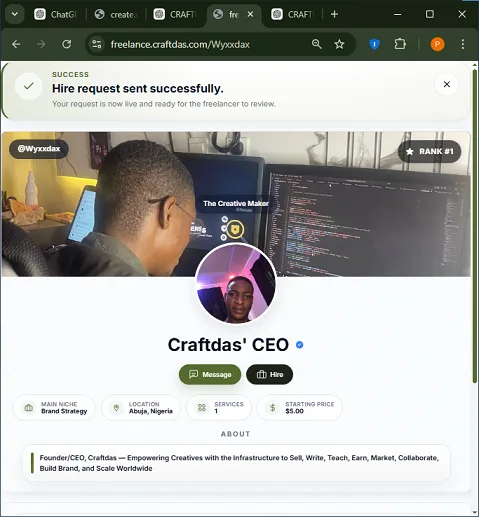
To see a live example of a Craftdas portfolio, visit craftdas.com/wyxxdax.
This is the portfolio of Ayodele Daisi Samuel, the founder of Craftdas. It showcases:
- A professional bio
- A profile photo
- Blog posts
- Products
- Services
- Mentorship programs
- Social links
Use this as inspiration for your own portfolio.
How to Share Your Portfolio
Your Craftdas portfolio is public. Here is how to share it:
Share the Link
Share your portfolio link: craftdas.com/[your-username]. Put it in your social media bios, email signatures, and anywhere else.
Include It in Your Content
Include your portfolio link in your blog posts, newsletters, and social media profiles.
Add It to Your Business Cards
If you have business cards, include your portfolio URL.
Use It as Your Resume
Your portfolio is a living resume. Share it with potential clients and employers.
Tips to Make Your Portfolio Stand Out
To make your Craftdas portfolio stand out, follow these tips:
1. Write a Compelling Bio
Your bio should be engaging, professional, and clear. Tell people who you are and what you can help them with.
2. Use a Professional Photo
A high-quality photo builds trust. Avoid casual or low-quality images.
3. Showcase Your Best Work
Display your best blog posts, products, and services prominently. Quality over quantity.
4. Keep It Updated
Regularly update your portfolio with new work, achievements, and content.
5. Be Authentic
Be yourself. Authenticity builds connection and trust.
My Personal Portfolio Story

I started my journey in 2017. I had no plan, no niche, no name. I applied for AdSense more times than I want to admit — never approved, not once. So I found another way: I started charging artists to feature their songs on my site. It taught me the first real lesson — if one door won't open, you build another one.
Then in 2018, my phone was stolen. I walked away for years.
I came back in 2025. Built a new site from nothing. Then from April 2025 to July 2026, my new posts simply would not index. Fourteen months of publishing into what felt like a void.
I kept going. Then Google indexed 580 pages of my site at once. That single event is why Craftdas exists — so other creators wouldn't have to guess their way through the same struggles I did.
Now my Craftdas portfolio at craftdas.com/wyxxdax is my public identity. It showcases my work, builds my brand, and attracts opportunities.
That is why I am sharing this guide. Because I know the Craftdas portfolio works.
How to Get Started
Ready to create your Craftdas portfolio? Here is how to get started:
Step 1: Sign Up Free
Sign up at onboarding.craftdas.com/start. It is completely free.
Step 2: Complete Onboarding
Complete your onboarding. Your portfolio is auto-generated.
Step 3: Choose Your Username
Choose a professional username. Your portfolio URL will be craftdas.com/[your-username].
Step 4: Customise Your Portfolio
Add your bio, photo, and showcase your best work.
Step 5: Share Your Portfolio
Share your portfolio link with the world. Build your brand.
To accelerate your success, check out these resources:
- Blogging From Zero – The complete beginner's guide to starting, growing, and earning from your first blog.
- Hybrid SEO – The 7-step system for beginner bloggers to rank without competing with big sites.
- SEO Content System (UBS v1.1) – A locked structure for writing better SEO content with any AI tool.
Related Guides
- Craftdas: The #1 All-in-One Creator Platform
- Craftdas Review 2026: How to Earn More Than Medium, Substack, Upwork & Fiverr Combined
- Craftdas Freelance Marketplace: List Services, Get Hired & Get Paid Instantly
Portfolio FAQ
What is the Craftdas portfolio?
The Craftdas portfolio is an auto-generated web page that every creator gets when they join Craftdas. It is accessible at craftdas.com/[your-username].
How do I create my Craftdas portfolio?
Sign up at onboarding.craftdas.com/start, complete your onboarding, and your portfolio is auto-generated. Choose your username and customise your portfolio.
What goes on my Craftdas portfolio?
Your portfolio includes your bio, profile photo, blog posts, products, services, mentorship programs, and social links.
Can I customise my portfolio?
Yes. While your portfolio is auto-generated, you can customise it. Update your bio, add a photo, and showcase your best work.
What is the URL of my portfolio?
Your portfolio URL is craftdas.com/[your-username]. Choose a professional username.
Can I share my portfolio?
Yes. Your portfolio is public. Share the link in your social media bios, email signatures, and business cards.
Disclosure: This post contains links to my own products. I only recommend tools I actually use to write my own content.
Comments
No comments yet. Start the conversation.