

Table of Contents
- 1. Why Sell Digital Products on Craftdas?
- 2. What Digital Products Can You Sell?
- 3. How to List a Digital Product on Craftdas
- 4. Setting Your Price
- 5. Affiliate Commission Setup
- 6. Payment Processing and Withdrawals
- 7. Platform Fees on Digital Products
- 8. Craftdas vs Gumroad vs Selar
- 9. Tips to Sell More Digital Products
- 10. My Personal Digital Product Story
- 11. How to Get Started
- 12. Digital Products FAQ
How to Sell Digital Products on Craftdas: Complete Guide (2026)

Why Sell Digital Products on Craftdas?
Selling digital products is one of the most profitable ways to earn passive income. Once you create a digital product, you can sell it over and over again with no additional cost.
And when you sell digital products on Craftdas, you get the benefits of a built-in audience, low platform fees, and seamless integration with the rest of your creator business.
Whether you are selling eBooks, templates, courses, or any other digital product, Craftdas gives you everything you need to start selling today.
What Digital Products Can You Sell?
On Craftdas, you can sell any type of digital product. Here are some examples:
eBooks
Write an eBook on any topic. Share your expertise. Sell it as a downloadable PDF.
Templates
Create templates for resumes, presentations, social media, or any other use case. Sell them as downloadable files.
Online Courses
Create a structured course with video lessons, downloadable resources, and assignments. Sell it as a complete package.
Checklists and Printables
Create helpful checklists or printables. Sell them as downloadable PDFs.
Software and Tools
If you build software, tools, or plugins, you can sell them on Craftdas.
Music and Audio
If you create music, sound effects, or audio content, you can sell them as downloads.
Art and Design Assets
If you create digital art, design assets, or graphics, you can sell them on Craftdas.
Note: No physical products are allowed. Digital only.
How to List a Digital Product on Craftdas
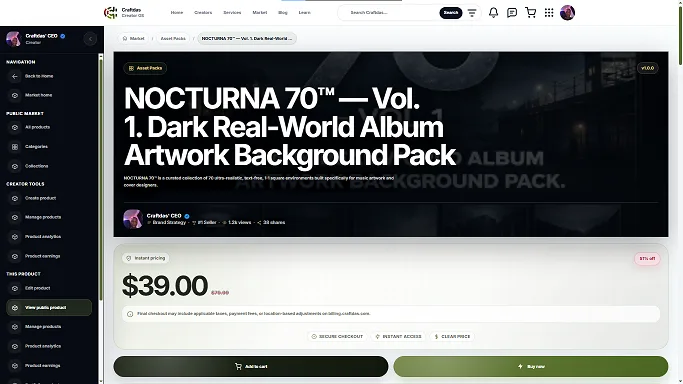
Listing a digital product on Craftdas is simple. Here is how to do it:
Step 1: Create Your Digital Product
First, create your digital product. Make it high-quality. Professional design matters.
Step 2: Sign Up and Complete Onboarding
Sign up at onboarding.craftdas.com/start. Complete your onboarding and create your profile.
Step 3: Go to the Products Section
Navigate to the products section of your dashboard.
Step 4: Create Your Product Listing
Describe your product. Include:
- Title – What is your product called?
- Description – What does the product do? What problem does it solve?
- Price – How much do you charge?
- File – Upload your digital product file
- Cover Image – Add a professional cover image
Step 5: Publish Your Product
Once your listing is complete, publish it. It will be visible to potential buyers on Craftdas.
Setting Your Price
You are in control of your pricing when you sell digital products on Craftdas. Here is how to think about pricing:
Consider Your Product's Value
Price your product based on the value it provides. If it saves someone hours of work, it is worth more.
Research Competitors
Research what others charge for similar products. Set a competitive price that reflects your product's quality.
Start with a Lower Price
If you are new, consider starting with a lower price. Build reviews and credibility. Then raise your prices.
Offer Tiered Pricing
Consider offering tiered pricing. A basic version, a premium version, and a deluxe version. This gives buyers options and increases your revenue.
Affiliate Commission Setup
One of the unique features when you sell digital products on Craftdas is the affiliate commission setup.
Set Your Own Commission Rate
You can set your own commission rate for affiliates who promote your products. You decide how much to pay affiliates.
Automatic Splits
Craftdas tracks sales, calculates commissions, and pays affiliates automatically. No manual work required.
Why This Matters
Most platforms do not give you control over affiliate commissions. Craftdas does. This means you can attract more affiliates to promote your products.
Payment Processing and Withdrawals
When you sell digital products on Craftdas, you need to know how payments and withdrawals work.
Payment Processing
For African creators, payments are processed through Paystack via direct bank transfer (like Opay to other banks). For international creators, payments are processed through Flutterwave.
24-Hour Check on Earnings
When you sell a digital product, there is a 24-hour check before the earnings are deposited to your wallet. This is a standard security measure.
Withdraw Anytime
Once your earnings are in your wallet, you can withdraw anytime you want. There are no withdrawal delays. You decide when to transfer your funds.
Direct Bank Transfers
Withdrawals go directly to your bank account. No PayPal delays. No holding periods.
Platform Fees on Digital Products
When you sell digital products on Craftdas, you keep more of your earnings than on any other platform.
Craftdas Fees
Craftdas takes 2-25% based on your creator tier. Higher-tier creators pay as little as 2%, keeping 98% of their earnings. This applies to ALL earnings — including digital product sales.
Competitor Fees
Gumroad takes 10% of every sale. Selar takes 5%. Teachable takes 5-10%. Compared to these, Craftdas is significantly more affordable for higher-tier creators.
When you sell digital products on Craftdas, you keep more of your money.
Craftdas vs Gumroad vs Selar
If you are deciding where to sell digital products, here is how Craftdas compares.
| Factor | Gumroad | Selar | Teachable | Craftdas |
|---|---|---|---|---|
| Platform fee | 10% | 5% | 5-10% | 2-25% tiered |
| Creator keeps | 90% | 95% | 90-95% | 75-98% |
| Affiliate marketing | Limited | Limited | Limited | Full (set your own commission) |
| Withdraw anytime | Slow | Slow | Slow | ✅ |
| All-in-one ecosystem | ❌ | ❌ | ❌ | ✅ |
For most creators, Craftdas offers the best combination of low fees, affiliate marketing, and an all-in-one ecosystem.
Tips to Sell More Digital Products
To succeed when you sell digital products on Craftdas, follow these tips:
1. Create High-Quality Products
Quality matters. Take the time to create professional, polished products. Good design and clear content sell better.
2. Write a Compelling Description
Your product description should clearly explain what the product is, what problem it solves, and why someone should buy it.
3. Use a Professional Cover Image
Your cover image is the first thing potential buyers see. Use a professional, eye-catching image.
4. Add Affiliate Marketing
Enable affiliate marketing for your products. Attract affiliates to promote your products for you.
5. Build Your Audience
Promote your products on social media, in your blog posts, and to your email list. The more people who know about your product, the more you will sell.
6. Collect and Showcase Reviews
Positive reviews build trust. Ask satisfied buyers to leave reviews. Showcase them on your product page.
My Personal Digital Product Story

I started my journey in 2017. I had no plan, no niche, no name. I applied for AdSense more times than I want to admit — never approved, not once. So I found another way: I started charging artists to feature their songs on my site. It taught me the first real lesson — if one door won't open, you build another one.
Then in 2018, my phone was stolen. I walked away for years.
I came back in 2025. Built a new site from nothing. Then from April 2025 to July 2026, my new posts simply would not index. Fourteen months of publishing into what felt like a void.
I kept going. Then Google indexed 580 pages of my site at once. That single event is why Craftdas exists — so other creators wouldn't have to guess their way through the same struggles I did.
Now I sell digital products on Craftdas. I sell eBooks, templates, and courses. I earn passive income from products I created once. And the best part? I keep 98% of my earnings at my current tier.
That is why I am sharing this guide. Because I know you can sell digital products on Craftdas and build a sustainable income stream.
How to Get Started
Ready to sell digital products on Craftdas? Here is how to get started:
Step 1: Create Your Product
Create your digital product. Make it high-quality.
Step 2: Sign Up Free
Sign up at onboarding.craftdas.com/start. It is completely free.
Step 3: List Your Product
Go to the products section of your dashboard. Create your product listing. Set your price. Upload your file. Publish it.
Step 4: Start Selling
Promote your product. Attract affiliates. Start earning passive income.
To accelerate your success, check out these resources:
- Blogging From Zero – The complete beginner's guide to starting, growing, and earning from your first blog.
- Hybrid SEO – The 7-step system for beginner bloggers to rank without competing with big sites.
- SEO Content System (UBS v1.1) – A locked structure for writing better SEO content with any AI tool.
Related Guides
- Craftdas: The #1 All-in-One Creator Platform
- Craftdas Review 2026: How to Earn More Than Medium, Substack, Upwork & Fiverr Combined
- Craftdas Freelance Marketplace: List Services, Get Hired & Get Paid Instantly
Digital Products FAQ
What digital products can I sell on Craftdas?
You can sell eBooks, templates, courses, checklists, printables, software, music, art, and any other digital product. No physical products are allowed.
How do I list a digital product on Craftdas?
Sign up at onboarding.craftdas.com/start, complete your onboarding, go to the products section, create your listing, set your price, upload your file, and publish it.
What are the platform fees for digital products?
Craftdas takes 2-25% based on your creator tier. Higher-tier creators pay as little as 2%, keeping 98% of their earnings. This applies to ALL earnings — including digital product sales.
Can I use affiliate marketing for my digital products?
Yes. You can set your own commission rate for affiliates who promote your products. Craftdas handles automatic splits.
How do I get paid for digital product sales?
African creators receive payments via Paystack (direct bank transfer). International creators receive payments via Flutterwave. You can withdraw anytime.
Is Craftdas better than Gumroad for selling digital products?
Yes. Craftdas has lower fees for higher-tier creators, better affiliate marketing features, and an all-in-one ecosystem that Gumroad does not offer.
Disclosure: This post contains links to my own products. I only recommend tools I actually use to write my own content.
Comments
No comments yet. Start the conversation.