
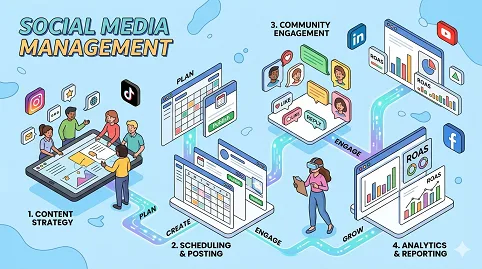

Social Media Management Blogging Roadmap: From Zero to Monetized Authority
A phased, search-intent driven plan for social media managers to learn the field, rank tutorials, build authority, and earn — starting with beginner-friendly content, not random engagement hacks or viral trends.
Google’s guidance: Helpful, reliable, people-first content wins. Google’s AI features & Bing Webmaster Guidelines reward content that answers real questions, surfaces in Copilot & AI search. This roadmap aligns with E-E-A-T and answer-engine optimization. If you're new to the platform, start by reading the Welcome to Craftdas guide to understand the connected ecosystem you'll be building within.
Why most new social media management bloggers fail: They start by posting scattered "Instagram tips" or "viral hacks" without a strategic foundation. Instead, a winning social media management blogger learns the field in phases, understands search intent (tutorials, strategy guides, tool comparisons, career advice), publishes beginner-friendly articles, builds internal links, optimizes for both search engines and AI answers, then monetizes through Craftdas blogging, affiliate offers (tools, courses, templates), social media services, and future courses. This guide gives you the exact playbook. The overall philosophy aligns with the reality that blog posts take time to rank — you're building long-term assets, not chasing quick wins.
For similar structured roadmaps in adjacent niches, explore the Content Writing Blogger Roadmap, the 3D Artist Blogging Roadmap, the Data Analyst Blogging Roadmap, the Digital Marketing Blogging Roadmap, and the Cybersecurity Blogging Roadmap — the same phased principles apply across disciplines.
Phase 1 — Beginner Social Media Management Foundation
Goal: Understand what social media management is, how the industry works, and what beginners actually search for. First posts must answer real beginner questions, not showcase advanced growth hacks or influencer strategies that intimidate readers.
Why this matters for social media management bloggers: Social media management spans content creation, community management, analytics, paid social advertising, influencer marketing, social commerce, crisis communication, and platform-specific strategies (Instagram, Facebook, LinkedIn, TikTok, Pinterest, Twitter/X, YouTube, Snapchat). A beginner blogger does not need to master everything. The smart path is to learn one area (e.g., Instagram for small businesses, LinkedIn for B2B, or Pinterest for bloggers) and teach as you learn. This "learn in public" approach builds trust and attracts readers who are at the same stage as you were weeks ago. The good news is that you can write posts that Google and AI understand even without SEO tools — clarity and structure matter more than expensive software.
What to post first: Beginner guides, platform explainers (Instagram, Facebook, LinkedIn, TikTok, Pinterest), social media glossary, simple tutorials (how to create a content calendar, how to schedule posts), common mistakes, free tools, and platform comparisons (Instagram vs TikTok for business, LinkedIn vs Facebook for B2B). Each piece of content should answer one clear question that a complete novice types into Google or Bing. For example, "what is social media management for beginners" has significant search volume — you can rank by writing a truly helpful, detailed guide of 2,500+ words with examples, a glossary, and a FAQ section. Including a definition box within the first 150 words also increases your chances of appearing in Google's AI Overviews and Bing's Copilot responses. Do not write thin, 500-word articles. Write definitive resources that become the go-to reference for beginners in your sub-niche.
Research queries to target (each becomes its own article): what is social media management for beginners, how does social media management work, organic vs paid social media, social media terms every beginner should know, types of social media management (content creation, community management, analytics, advertising), common social media management mistakes beginners make, how to learn social media management from scratch, best free social media management tools for beginners, best paid social media tools for professionals, how to create your first social media content calendar, how to build a social media management portfolio, how to get a social media management job with no experience, social media certifications for beginners (HubSpot, Hootsuite, Meta Blueprint).
Insight specific to social media management bloggers: New social media bloggers often skip "why social media management matters for different business types." Create a post: "Why ecommerce stores, local businesses, B2B companies, and creators need social media management — 4 business types explained" — that attracts both aspiring social media managers AND potential clients. This dual-audience approach is powerful. To optimize this post for Google, include subheadings like "Business Type 1: Ecommerce (social commerce, product tagging, shoppable posts)" and "Business Type 2: Local Businesses (Google Business Profile, local engagement, review responses)." Add a real-world case study or hypothetical example showing how a local coffee shop increased foot traffic by 40% using Instagram Stories and local hashtags.
Phase 2 — Pick A Clear Social Media Management Sub-Niche
Instead of being a generic "social media blog" covering everything from Instagram Reels to LinkedIn articles to TikTok trends, specialize. Readers trust specialists, and search engines reward niche authority. A blog that covers "Instagram marketing for boutique owners" will outrank a general social media blog for keywords like "how to grow an Instagram account for a clothing store."
Best sub-niches with high search demand and reasonable competition for beginners:
- Instagram marketing for small businesses — Focus on Reels, Stories, carousels, hashtag strategy, engagement tactics, and Instagram SEO. Target boutique owners, coaches, artists, and local service providers.
- LinkedIn marketing for B2B — Focus on company pages, personal branding, thought leadership content, LinkedIn newsletters, and lead generation. Target B2B marketers, consultants, and agency owners.
- Pinterest marketing for bloggers and ecommerce — Focus on pin design, keyword research for Pinterest, rich pins, idea pins, and driving traffic to blogs/products. Target bloggers, Etsy sellers, and content creators.
- TikTok for business — Focus on trending sounds, hashtags, editing tips, duets, and the TikTok algorithm. Target Gen Z-focused brands and creators.
- Facebook marketing for local businesses — Focus on Facebook pages, groups, events, local awareness ads, and community building. Target restaurants, real estate agents, and local service providers.
- Social media analytics and reporting — Focus on metrics interpretation, dashboard creation, ROI calculation, and client reporting. Target freelancers and agency owners. This complements the Data Analyst Blogging Roadmap.
- Social media content creation and design — Focus on Canva tutorials, video editing, caption writing, and visual branding. Target content creators and small business owners. This complements the Content Writing Blogger Roadmap.
- Social media management for ecommerce — Focus on social commerce, product tagging, user-generated content, influencer collaborations, and conversion tracking. Target online store owners.
- Social media for real estate agents — Focus on property showcases, virtual tours, client testimonials, local market updates, and lead generation. Target real estate professionals.
- Social media for restaurants and hospitality — Focus on food photography, behind-the-scenes, customer engagement, reservation promotion, and user-generated content. Target restaurant owners and hospitality managers.
Research queries to find your profitable angle: profitable social media blog niches, best social media niches for beginners, social media topics people search for, Instagram marketing blog niche ideas, LinkedIn marketing blog topics, Pinterest blog ideas for beginners, TikTok marketing blog topics, most requested social media services online (content creation, community management, analytics, advertising management, strategy consulting), how to position a social media blog for affiliate marketing.
Once you pick your sub-niche, write a "manifesto post" explaining exactly who you serve. For example: "Why I Help Boutique Owners Grow Their Instagram Following Without Paid Ads." For additional structure on niche authority, review the Digital Marketing Blogging Roadmap and the 3D Artist Blogging Roadmap.
Phase 3 — Keyword Research For Social Media Management Blog
Goal: Find what people already search for before writing. For a social media blog, focus on keywords with "how to," "what is," "best," "vs," "for beginners," "guide," "tips," "free," "tools," "template," "strategy," "ideas," "examples," "post," "caption," "hashtag," "algorithm," "growth," and "analytics" modifiers. Avoid head terms like "social media marketing" (too competitive) and target long-tail phrases like "how to create an Instagram content calendar for small business" or "best free hashtag research tools."
What to post after keyword research: Strategy guides, tool comparison posts, tool roundups, mistake posts, template posts, checklist posts, and beginner roadmaps.
Research queries to use in your keyword tool: keyword research for social media blog, low competition Instagram keywords, long tail keywords for LinkedIn marketing, social media keyword ideas for beginners, Pinterest marketing keywords with low competition, TikTok keywords for blog posts, Facebook marketing keywords for small business, social media questions people ask on Google, People Also Ask social media topics, how to find buyer intent keywords for social media services.
Example keyword table for a social media blog:
- "how to grow Instagram followers organically" — Volume: 10,000-50,000 — Difficulty: High — Intent: Informational — Article: Organic growth strategies (target long-tail variations first)
- "Later vs Buffer vs Hootsuite" — Volume: 500-2,000 — Intent: Commercial — Article: Comparison with affiliate links
- "best free Canva templates for Instagram" — Volume: 1,000-5,000 — Intent: Commercial — Article: Roundup post with affiliate links to paid templates
- "how much to charge for social media management" — Volume: 500-2,000 — Intent: Commercial — Article: Pricing guide + service CTA
- "common Instagram hashtag mistakes" — Volume: 300-1,000 — Intent: Informational — Article: Mistake post with fixes
Create a spreadsheet with columns for keyword, search volume, keyword difficulty, intent, and suggested article title. Target 2-3 keywords per article.
Phase 4 — Content Pillars For The Social Media Management Blog
Pillar 1: Social Media Management Basics For Absolute Beginners — This pillar targets people who have never managed a social media account professionally. Target keywords: social media management beginner guide, how to start social media management, social media platforms explained (Instagram, Facebook, LinkedIn, TikTok, Pinterest, Twitter/X, YouTube), what should a beginner learn first (content creation, scheduling, engagement, analytics), social media management learning roadmap, essential social media skills for beginners (copywriting, basic design, community management, data interpretation), how to build a social media management portfolio, social media certifications (HubSpot Social Media Certification, Hootsuite Platform Certification, Meta Blueprint). For portfolio strategies, the Data Analyst Blogging Roadmap offers excellent examples of project-based portfolio building.
Pillar 2: Platform-Specific Strategies (Instagram, TikTok, LinkedIn, Pinterest, Facebook) — This pillar teaches readers how to succeed on each major platform. Create separate sub-categories for each platform.
- Instagram marketing: Instagram algorithm explained (2025), how to use Reels for reach, Stories engagement hacks, carousel post best practices, hashtag strategy (how many, which types, where to place), Instagram SEO (keywords in bio, captions, alt text), engagement tactics (DMs, comments, shares, saves), Instagram analytics (reach, impressions, profile visits, follows), Instagram Shopping setup, Link in bio optimization (Linktree, Beacons, Later's Linkin.bio).
- TikTok marketing: TikTok algorithm explained (For You Page), trending sounds and effects, hashtag strategy for discovery, video editing tips (cuts, transitions, text overlays), duets and stitches, TikTok analytics (watch time, completion rate, engagement), TikTok SEO (keywords in captions and text overlays), TikTok for business features.
- LinkedIn marketing: LinkedIn algorithm explained, personal branding vs company page strategy, thought leadership content (long-form posts, articles, newsletters), engagement tactics (comments, shares, DMs), LinkedIn analytics (impressions, engagement, follower demographics), LinkedIn lead generation (Sales Navigator, content offers, InMail).
- Pinterest marketing: Pinterest as a visual search engine, keyword research for Pinterest (using Pinterest search bar, trends tool), pin design best practices (vertical aspect ratio 2:3, text overlays, branding), rich pins (product, recipe, article), idea pins for reach, Pinterest analytics (impressions, saves, outbound clicks), driving traffic from Pinterest to blog/shop.
- Facebook marketing: Facebook algorithm explained, Facebook Pages vs Groups vs Profiles for business, engagement strategies (posts, stories, live video, events), Facebook Groups for community building, Facebook analytics (Page Insights, audience demographics), Facebook Business Suite.
Pillar 3: Social Media Content Creation And Strategy — This pillar teaches readers how to plan, create, and schedule content effectively. Target keywords: social media content strategy for beginners, how to create a social media content calendar (templates included), content pillar framework (educate, entertain, inspire, sell), content repurposing strategies (blog post → social posts → email → video), Canva tutorial for social media graphics (templates, branding kit, resizing), video creation for social media (filming, editing, captions, thumbnails), caption writing formulas (hook, body, CTA, hashtags), user-generated content strategy (how to encourage, repurpose, credit, and measure), social media content themes (day-specific: Motivation Monday, Tip Tuesday, Throwback Thursday, Feature Friday), content batching and scheduling workflows, social media posting frequency by platform (recommendations). This pillar connects to the Content Writing Blogger Roadmap for caption and copywriting depth.
Pillar 4: Social Media Analytics, ROI, And Reporting — This pillar teaches readers how to measure and prove social media value. Target keywords: social media analytics for beginners, key social media metrics explained (reach, impressions, engagement rate, clicks, conversions, ROI), how to calculate engagement rate (by reach vs by followers), social media reporting best practices (what to include, how often, how to present), how to create a social media dashboard (using Google Looker Studio, Hootsuite Analytics, Buffer Analyze), how to prove social media ROI to clients (tracking conversions, attribution, customer journey), social media audit template, competitor social media analysis, social listening basics (monitoring brand mentions, keywords, sentiment), analytics tools for social media managers (native platform insights, Google Analytics, social media management tools). This pillar connects to the Data Analyst Blogging Roadmap for deeper analytics training.
Pillar 5: Monetization — Services, Affiliates, Templates, And Freelancing — This pillar is critical for income. Target keywords: how to make money with social media management, how to start a social media management business, best freelance platforms for social media managers (Upwork, Fiverr, Toptal, Contra, LinkedIn), how to find social media freelance clients (networking, cold outreach, inbound from blog, referrals), how to price social media management services (hourly vs package vs retainer), social media management service packages (content creation only, community management, full-service management, strategy consulting, analytics reporting), how to sell social media templates (content calendar templates, caption templates, hashtag research templates, audit templates, report templates, strategy presentation templates) on Craftdas Market, best affiliate programs for social media managers (Craftdas, Canva, Later, Buffer, Hootsuite, Sprout Social, Planoly, Tailwind, Loomly, VistaCreate, Adobe Express, ManyChat, Linktree, Beacons), how to create a paid social media course (Instagram growth course, LinkedIn B2B marketing course, content creation bootcamp), how to build an email list as a social media blogger. The monetization strategies here complement those detailed in the Digital Marketing Blogging Roadmap and Cybersecurity Blogging Roadmap.
Each pillar should have a dedicated category page. Interlink pillar pages to each other where relevant — for example, the content creation pillar links to the analytics pillar for measuring performance, and the platform pillar links to both.
Phase 5 — How To Write Posts That Can Rank (Search + AI Answers)
Goal: Every post should answer one clear search intent. Matching intent is the single most important ranking factor after relevance. Always check the top 3 Google results for your target keyword before writing.
Recommended post structure:
- Clear title with the main keyword near the beginning. Example: "Instagram Reels Tutorial For Beginners: How To Create Engaging Reels In 5 Steps" — not "Instagram Reels Tips."
- Short direct answer within the first 150 words. For "what is social media engagement rate," write: "Social media engagement rate measures the percentage of your audience that interacts with your content through likes, comments, shares, and saves. It's calculated by (total engagements ÷ reach or followers) × 100."
- Beginner-friendly explanation using simple language. Define every term the first time you use it. Break complex ideas into analogies (e.g., "the algorithm is like a librarian — it decides which content to show to which people based on past behavior.").
- Step-by-step guide with numbered steps and screenshots. For process-oriented content (how to schedule a post, how to create a Reel, how to run an ad), include annotated screenshots or screen recordings.
- Examples of good and bad practices. Show a weak caption and a strong one. Show a low-engagement post and a high-engagement version with changes highlighted.
- Common mistakes section with at least 5 specific errors. For Instagram: using too many or irrelevant hashtags, inconsistent posting schedule, no engagement with followers, low-quality images, ignoring analytics. Use a table format: Mistake | Why It Hurts | How To Fix It.
- Checklist or downloadable resource. A printable "social media content calendar template," "Instagram hashtag strategy worksheet," or "engagement rate calculator" increases email signups and dwell time.
- Internal links to 3-5 related posts. For a post about Instagram Reels, link to "Instagram Stories vs Reels," "Instagram algorithm explained," "content creation tips," "analytics for Instagram," and "social media scheduling tools."
- Craftdas CTA that matches the post's intent. For tutorials: "download my free Instagram Reels checklist from Craftdas Market." For service-related content: "hire me for social media management." If you plan to sell digital products, review how to sell digital products on Craftdas Market.
- FAQ section with 5-10 questions and concise answers. Use FAQ schema markup (JSON-LD) to help Google show your FAQ directly in search results.
Additional insight for AI answers: Answer engines prioritize structured, concise, authoritative content. Use definition lists, include a "key takeaways" box at the top of long guides, format examples clearly, and cite platform documentation (Meta, TikTok, LinkedIn, Pinterest official resources).
Phase 6 — Internal Linking Strategy For Social Media Topic Clusters
Goal: Build topic authority by connecting related posts together. Internal links pass "link equity" and help search engines understand your site's structure.
Main pillar article: Social Media Management For Beginners: The Complete Roadmap To Growing Accounts, Creating Content, And Making Money On Craftdas — This article cross-links to other roadmap content: the Content Writing Blogger Roadmap, 3D Artist Blogging Roadmap, Data Analyst Blogging Roadmap, Digital Marketing Blogging Roadmap, and Cybersecurity Blogging Roadmap.
Supporting posts:
- What Is Social Media Management And How Does It Work?
- Instagram Marketing For Small Businesses (Complete Guide)
- How To Create A Social Media Content Calendar (Free Template)
- LinkedIn Personal Branding For Beginners
- How To Calculate Social Media Engagement Rate (Formula + Calculator)
- Common Social Media Management Mistakes Beginners Make
- Best Free Social Media Scheduling Tools 2025
- How To Make Money With Social Media Management On Craftdas
Internal linking best practices: Use descriptive anchor text, aim for 5-10 internal links per 2000 words, link from high-traffic pages to newer posts, and avoid orphaned pages.
Phase 7 — Ranking In Search Engines And AI Answers
Goal: Make your content easy for Google, Bing, AI search, and answer engines to understand. Understand the reasons why blog posts take time to rank — this will keep you motivated during the early months.
Best content types for AI and search visibility:
- Definition posts ("what is social media engagement rate")
- Beginner roadmap posts ("how to become a social media manager in 6 months")
- Checklist posts ("Instagram SEO checklist")
- Comparison posts ("Later vs Buffer vs Hootsuite")
- Step-by-step tutorials with numbered steps and screenshots
- FAQ posts ("50 social media manager interview questions")
- Mistake-and-fix posts ("5 Instagram Reels mistakes that hurt reach")
- Resource posts ("best free social media tools 2025")
- Template posts ("free social media content calendar template")
Research queries for AI optimization: how to optimize social media tutorials for AI answers, how to appear in AI answers with social media content, answer engine optimization for social media managers, how to structure blog posts for AI search, how to write direct answers, how to optimize for Google AI Overviews, how to optimize for Bing Copilot search, how to write FAQ schema for social media posts, how to make content easy for AI to summarize, how to write experience-based social media content (share your "when I first managed an account, I struggled with X" stories).
Phase 8 — Craftdas Blog + Affiliate Monetization For Social Media Managers
Goal: Turn traffic into income using multiple revenue streams: affiliate income, digital product sales, and services.
Money routes on Craftdas:
- Publish social media tutorials — Monetize through display ads once you have 10,000+ monthly pageviews.
- Promote Craftdas affiliate offers — Refer new bloggers, buyers, or sellers to Craftdas.
- Recommend social media tools as an affiliate — Join programs for Canva, Later, Buffer, Hootsuite, Sprout Social, Planoly, Tailwind, Loomly, VistaCreate, Adobe Express, ManyChat, Linktree, Beacons, and any tool you genuinely use. Create "best tools" roundups and comparison posts. Disclose affiliate relationships clearly.
- Sell social media templates on Craftdas Market — Create content calendar templates (monthly, weekly, daily), caption templates (for each platform and content type), hashtag research templates (spreadsheets), audit templates, report templates (client-facing dashboards), strategy presentation templates, social media plan templates, and engagement tracker templates. Price templates $5-$50. Bundle 5-10 assets into a "starter pack" for $30-$100. Use the guide to selling digital products to optimize listings.
- Offer social media management services — Create a "Hire Me" page listing: content creation package ($500-$2,000/month), community management ($300-$1,500/month), full-service management ($1,000-$5,000/month), strategy consulting ($500-$2,500/project), analytics reporting ($200-$1,000/month). Package into monthly retainers.
- Offer social media audits — Review a client's social media presence and provide a report with recommendations. Price $200-$1,500 depending on platform count and depth.
- Offer social media training and coaching — One-on-one coaching for business owners who want to manage their own social media, or team training for agencies. Price $100-$500/hour or $500-$5,000 for a training workshop.
- Create paid social media courses — Once you have 50+ blog posts and an email list of 1,000+, create a course: "Instagram Growth Masterclass" or "Social Media Management For Freelancers" or "Content Creation Bootcamp" priced $197-$997.
- Sell done-for-you social media content — Custom-designed posts with captions and hashtags for a month. Price $500-$3,000/month depending on volume and platform.
Research queries for monetization: how social media managers make money with blogs, affiliate marketing for social media bloggers, best affiliate programs for social media managers (Craftdas, Canva (affiliate program), Later (affiliate), Buffer, Hootsuite, Planoly, Tailwind, VistaCreate, Adobe Express), how to write social media tool affiliate posts that convert, how to sell social media templates online, how to price social media management services, how to offer social media audits on Craftdas, how to turn blog readers into clients, how to build income streams from a social media blog.
Start monetization early: affiliate links in first 10 posts, one free template as email lead magnet by post #5, "Hire Me" page by post #10.
Phase 9 — Massive Growth Content Strategy For Social Media Managers
Goal: Create posts that attract beginners, small business owners, marketing managers, and affiliate clicks.
High-income post types:
- Best tools posts — "Best free social media scheduling tools" or "Best Canva alternatives for social media graphics." Affiliate-rich.
- Tool comparison posts — "Later vs Buffer vs Hootsuite" or "Canva vs Adobe Express." High-intent commercial keywords.
- Best courses posts — "Best Instagram marketing courses for beginners" with affiliate links to Udemy, Coursera, HubSpot.
- Free resources roundups — "100+ free social media templates" or "50 free stock photo sites for social media" — collect emails for the full list.
- Pricing guide posts — "How much to charge for social media management (2025 guide)" — attracts freelancers and clients.
- Mistake posts — "7 Instagram hashtag mistakes that kill reach" — monetize via hashtag strategy service or template.
- Template posts — "Free social media content calendar template" — gate the editable version for email or sale.
- Checklist posts — "The ultimate Instagram SEO checklist (30 items)" — downloadable PDF or template sale.
- Case study posts — "How I grew an Instagram account from 0 to 10k followers in 3 months" — monetize via coaching and services.
- Strategy guide posts — "LinkedIn personal branding strategy for consultants" — monetize via strategy consulting and templates.
Research queries for high-income content: best free social media scheduling tools 2025, Later vs Buffer vs Hootsuite comparison, best Instagram marketing course for beginners, how much to charge for social media management, common Instagram hashtag mistakes, social media content calendar template free, Instagram SEO checklist, how to grow Instagram followers organically.
Phase 10 — 90-Day Posting Plan For Social Media Management
Month 1: Learn And Publish Basics (Foundation Phase)
- Week 1: "social media management for beginners" (pillar preview) + "what is social media management" (definition post)
- Week 2: "how to learn social media management from scratch" (roadmap) + "organic vs paid social media explained"
- Week 3: "social media terms glossary (100+ terms)" + "common social media management mistakes beginners make"
- Week 4: "best free social media tools for beginners" + "how to create a social media content calendar (template)"
End of Month 1: 8-10 posts, 500-2000 monthly pageviews.
Month 2: Build Authority And Internal Links (Cluster Phase)
- Week 5: "Instagram algorithm explained (2025)" + "how to use Instagram Reels for reach"
- Week 6: "LinkedIn personal branding for beginners" + "how to calculate social media engagement rate"
- Week 7: "Pinterest keyword research for bloggers" + "how to create a social media report for clients"
- Week 8: "Canva tutorial for social media graphics" + "common Instagram hashtag mistakes"
End of Month 2: 16-20 total posts, internal links established, 1000-5000 pageviews.
Month 3: Monetization And Affiliate Content (Income Phase)
- Week 9: "best social media scheduling tools (affiliate roundup)" + "Later vs Buffer vs Hootsuite comparison"
- Week 10: "how to make money with social media management on Craftdas" + "how to sell social media templates online"
- Week 11: "how much to charge for social media management (pricing guide)" + "social media manager portfolio examples"
- Week 12: "how to get freelance social media clients" + "best Instagram marketing courses for beginners (affiliate)"
End of Month 3: 24-30 total posts, 2000-10,000 pageviews, first affiliate commissions ($50-$200), first template sale, first service inquiry.
Best First Pillar Article
Social Media Management For Beginners: The Complete Roadmap To Growing Accounts, Creating Content, And Making Money On Craftdas — 5000-10000 words with table of contents, internal links to cluster articles, and CTAs for free templates, coaching, and services.
Best First Supporting Posts
- What Is Social Media Management And How Does It Work?
- How To Create A Social Media Content Calendar (Free Template)
- Instagram Marketing For Small Businesses (Complete Guide)
- How To Calculate Social Media Engagement Rate (Formula + Calculator)
- LinkedIn Personal Branding For Beginners
- Common Social Media Management Mistakes Beginners Make
- Best Free Social Media Scheduling Tools 2025
- How To Make Money With Social Media Management On Craftdas
These 9 articles form your minimum viable social media management blog. Publish within 30 days.
Simple Craftdas Funnel For Social Media Managers
- Reader finds article through Google, Bing, AI search, or Craftdas discovery (e.g., "how to create a social media content calendar").
- The article answers the reader's question completely with step-by-step instructions, screenshots, and a downloadable template.
- The article links to related posts (social media scheduling tools, engagement rate calculator, platform-specific strategies).
- The article recommends a product or service: "Download my free content calendar template" (email opt-in) or "Buy my social media content planner on Craftdas Market for $9."
- The reader buys, downloads, or contacts you for social media management services.
Final Direction
This social media management blogger should start with beginner education (platform basics, content calendars, engagement strategies), build content clusters around specific platforms and skills, then layer monetization. The long-term goal is to turn the Craftdas blog into a full income system: traffic from search, trust from clear tutorials and templates, affiliate income from tool recommendations, sales from content calendars and templates, and clients from social media management services.
The same phased, intent-driven approach that powers the 3D Artist Blogging Roadmap, Content Writing Blogger Roadmap, Data Analyst Blogging Roadmap, Digital Marketing Blogging Roadmap, and Cybersecurity Blogging Roadmap applies directly to social media management — because whether you're teaching Instagram Reels or SQL joins, the principles of beginner-first education, search intent matching, and multi-channel monetization remain constant.
Critical insight for social media management bloggers in 2025: Don't just post "trend alerts" or "hacks." Write learning paths. Every beginner who lands on your blog should feel they got a mini-course for free. Combine people-first experience (your own client wins, platform struggles, algorithm frustrations) with answer-engine optimization (clear definitions, structured data, concise answers). The most successful social media management bloggers are not the ones with the most followers — they are the best teachers. Document your journey from beginner to expert. Share your failed campaigns, low engagement posts, and client challenges. That authenticity and specificity is what AI cannot replicate and what readers will trust. That trust converts into template sales, affiliate clicks, and social media management clients.
Comments
No comments yet. Start the conversation.